


Uplift: Stock Market Tracker
4.63.04K Reviews
App Specs
- Version
- 1.9.20
- Updated On
- License
- Free
- Downloads
- 500,000+
- Developer
- Uplift: Stock Market & Finance
- Categories
- Finance
- Platform
- Android
Screenshots
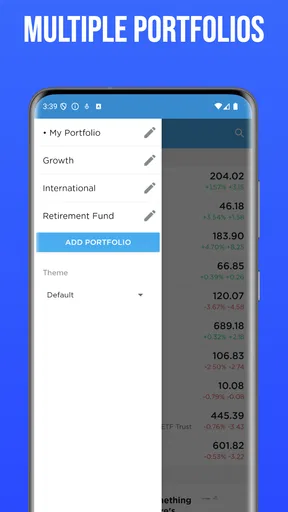
 Analysis by AppCompare
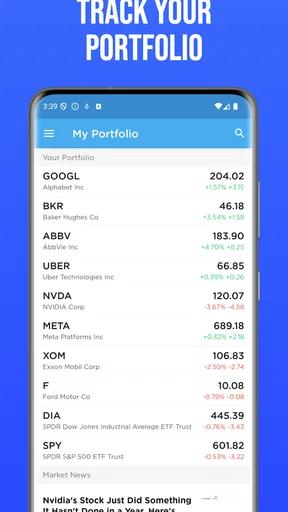
My main question with any stock-tracking app is whether it makes checking the market clearer or simply gives me more reasons to stare at prices. Uplift: Stock Market Tracker is built around following stocks, keeping an eye on market news, and setting alerts, so its appeal is practical rather than mysterious: it can put a watchlist and relevant headlines in one place. I’d treat it as a companion for staying informed, not as a substitute for deciding what to do with my money.
What the free access is worth
Uplift is a free finance app from Uplift: Stock Market & Finance, with in-app purchases listed between $2.99 and $35.99 per item. That makes it possible to try the basic app without paying upfront, but it doesn’t tell me which paid items are useful or whether they suit a particular person. I’d start with the free access and only consider a purchase after checking its details in the app and deciding that it solves a real need.
The app has a 4.6 average from around 13,000 ratings, and it has been installed over 500,000 times. Those figures suggest that plenty of people have tried it, but they don’t tell me whether its tools fit my habits or whether a paid option is worthwhile. Its Everyone content rating makes the intended audience broad; that should not be confused with financial advice or a promise that investing is suitable for every age or situation.
Where it can earn a place in a daily routine
The clearest value here is convenience. If I’m following a handful of companies, I can use a watchlist to keep them together and check headlines without jumping between a brokerage account, a news app, and a general-purpose finance site. A price alert can also help me stop repeatedly refreshing a quote: I can set a point to watch, then return to other things until the notification gives me a reason to look again.
That workflow is useful for someone learning to follow the market, or for an investor who wants a quick monitoring screen alongside a separate account for actual trades. It is less compelling if I already have a brokerage app that offers the same watchlists, alerts, and news in a way I trust. I would compare those tools before paying for anything, rather than assuming a dedicated tracker automatically adds value.
Simplicity Meets Functionality
Right off the bat, Uplift: Stock Market Tracker greets you with a clean, intuitive interface. There's no overwhelming clutter or confusing jargon here. It’s like walking into a well-organized library where everything is exactly where you’d expect it to be. The home screen gives you a snapshot of the most important market trends and personalized watchlists. This design is perfect for both stock market newbies and seasoned traders wanting a quick glance.
Features That Stand Out
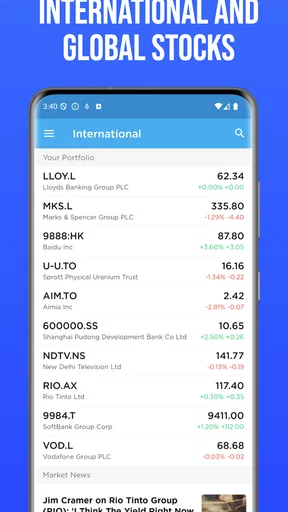
Now, let’s talk features. The app offers real-time market data, which is a lifesaver for those spontaneous trading decisions. You can easily track stocks, ETFs, and even cryptocurrencies. The search function is robust, allowing you to filter through a vast array of tickers with ease. But what really stands out is the personalized news feed. It's like having a news assistant who only brings you the headlines that matter to your portfolio.
Worth Reading Before You Choose

EA SPORTS FC Mobile 26 Is a Bigger Football Game, but It Takes Time

Flipboard Shows What News Apps Must Do Beyond the Feed

Switching to Android Auto Means Rethinking Your Driving Routine

Google Calendar Makes a Crowded Week Easier to Manage

Ludo King Makes the Most of the Minutes Between Plans

Baby Panda World Brings Quick Play to Modern Phones, but Its Game Library Feels Busy
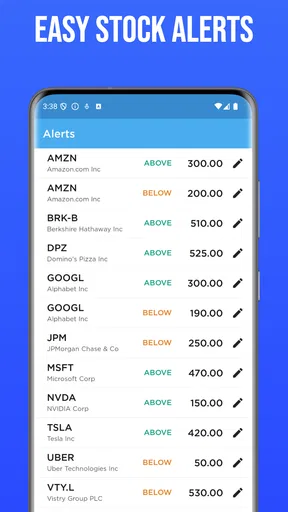
There’s also a neat feature where you can set alerts for specific stock price movements. Imagine getting a nudge every time your stock hits a target price – it’s like having a smart assistant who’s got your back 24/7.
Making alerts and news genuinely useful
I get the most from an alert when I decide in advance what it is supposed to tell me. A threshold can be a reminder to review my reasons for watching a stock, not a command to buy or sell. That distinction matters because a notification captures a price event, not the context behind it. I’d keep alerts for a short list of meaningful levels instead of setting one for every small move; otherwise, the phone can become noisy and each ping loses its value.
News is most useful when I treat it as a starting point. A headline connected to a company on my watchlist can point me toward a question to investigate, but it is not a complete explanation of a market move. I’d open the original reporting or company material before acting, and I would avoid letting a personalized feed narrow my attention to only the companies I already follow. A separate broad market check can help balance that habit.
Educational Resources
For those of us who aren’t exactly Wall Street wizards, Uplift includes a treasure trove of educational resources. From beginner guides to advanced trading strategies, the app has you covered. It’s like taking a mini-course on finance without leaving the couch. The lessons are bite-sized and digestible, making them perfect for learning on the go.
How it compares with other ways to follow markets
Compared with a brokerage app, a dedicated tracker can feel less tied to placing trades and more suited to watching a list and reading related coverage. But brokerages often make sense when I want the quote, my holdings, and order controls together; using two apps means accepting some switching and checking that I am looking at the right account or ticker. Compared with a broad financial news app, Uplift’s described focus on stocks, watchlists, and portfolio alerts is more targeted, while a general news source may be better for following economic stories beyond individual companies.
A spreadsheet is another reasonable alternative if I only follow a few names and want to record my own notes or investment rationale. It takes more upkeep and will not automatically serve as a news feed or notification tool, but it can make my thinking easier to audit later. I’d choose Uplift for convenient monitoring, a brokerage for account-linked trading, and a spreadsheet when my priority is a deliberate record rather than frequent updates.
Performance and Reliability
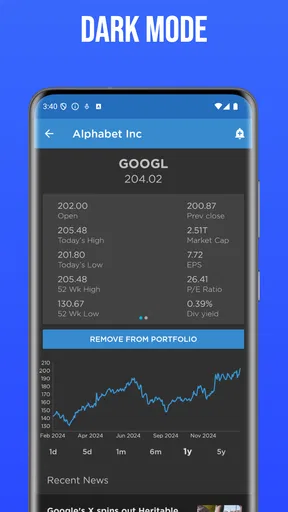
In terms of performance, the app is smooth and responsive. Whether you’re flicking through stock charts or scrolling through news articles, everything loads up without a hitch. Uplift seems to have nailed the balance between a sleek user interface and powerful functionality. I've yet to encounter any bugs or crashes, which is a huge plus in my book.
Practical trade-offs before relying on it
My biggest caution is not to treat any tracker as an authority on what a security is worth. Market information can help me notice movement, but it cannot decide whether a company fits my goals, time horizon, or tolerance for loss. I’d use the app to observe and organize, then check important details against sources I consider reliable before making a financial decision.
There is also a real trade-off in keeping alerts and a personalized feed close at hand: they save effort, but they can encourage more checking. For a long-term investor, a daily stream of price changes may add anxiety without improving a plan. I’d set only the alerts I can explain, mute or remove ones that no longer matter, and use a planned review routine rather than opening the app every time I have a spare moment.
Who is likely to get value from it?
I’d recommend giving it a try if you want a straightforward place to gather stocks you follow, notice related headlines, and receive reminders about price movements. It may be especially helpful when you are building the habit of learning how markets behave, provided you treat the educational material as a starting point and keep decisions grounded in your own research. The app is free to begin with, and the current version is 1.9.20; it supports Android 6.0 and later.
It is a weaker fit for someone who wants a full-service investing account, personalized professional advice, or a carefully maintained portfolio ledger. It is also not the best choice if a current brokerage already covers the monitoring tasks you need, or if notifications make you react impulsively. Uplift is an app for watching and organizing market information; that narrower role is useful, but it is not the same as managing investments end to end.
Personalized Experience
The customization options are a nice touch. You can tailor the app to your liking, from the color scheme to the layout of your dashboard. This means your experience can be as unique as your trading style. The app remembers your preferences, so every time you log in, it feels like it was designed just for you.
A practical way to keep that personalized screen useful is to separate “I own this” from “I’m researching this” in your own routine, even if the app presents both as things you follow. Otherwise, a watchlist can quietly become a mix of holdings, curiosities, and old ideas that no longer deserve attention. Reviewing it occasionally helps make headlines and alerts easier to interpret, since each item still has a reason to be there.
“Uplift is like having a stock market buddy who’s always in the know and never too busy to help.”
Final Thoughts
Overall, Uplift: Stock Market Tracker is a breath of fresh air in the world of finance apps. It manages to be both accessible and powerful, catering to a wide range of users without compromising on features. Whether you’re just dipping your toes into the stock market waters or you’re a seasoned trader looking for a reliable tool, Uplift is worth checking out. It’s not just an app; it’s a companion on your financial journey.
If you’re ready to take your stock tracking game to the next level, Uplift is available for download on both Android and iOS platforms. Give it a try, and who knows? You might just find it becomes your favorite financial sidekick.
A realistic everyday use
Imagine I have a few companies on my mind and a busy workday ahead. I can check my watchlist in the morning, notice a headline that deserves a closer look, and set an alert for a price level I already decided matters. If the alert arrives during lunch, I can review the news and my own reasons for following the stock instead of making a rushed decision from the notification alone. If nothing happens, I have not needed to keep refreshing a quote all day.
That is the kind of modest, repeatable benefit I value: less searching around and a clearer prompt for when to investigate. It will not remove the uncertainty of investing, and it should not turn a passing market move into an automatic action. Used with that boundary, a tracker can support a calmer routine rather than replace one.
My buy-or-skip verdict
I’d try Uplift if I wanted a free starting point for following market names, headlines, and alerts in one finance app. Its broad reach is reflected in its 4.6 average rating and over 500,000 installs, but popularity is not a personal recommendation; the right test is whether the app’s watch-and-review routine is genuinely more convenient than the tools I already use. It was released on August 20, 2016, and is rated for Everyone.
My advice is to begin without spending, build a small watchlist, and see whether the alerts and news reduce friction rather than increase screen time. If a paid item catches your eye, check what it does and whether you will use it before buying; listed in-app purchases range from $2.99 to $35.99 per item. If you mainly need trade execution, account records, or a hands-off investment plan, I’d choose a tool designed for that job instead. For focused market monitoring, though, Uplift is a reasonable app to test on its free access.
Pros
- User-friendly interface for easy navigation.
- Real-time updates keep data fresh.
- Customizable alerts for stock changes.
- Comprehensive analytics support.
- Supports both Android and iOS platforms.
Cons
- Lacks offline functionality.
- Limited free features available.
- Ads can be intrusive at times.
- Requires stable internet connection.
- No integration with some brokerage accounts.
FAQs for Uplift: Stock Market Tracker
What features does Uplift: Stock Market Tracker offer?
Uplift: Stock Market Tracker provides real-time stock quotes, customizable watchlists, and interactive charts. It offers news updates and insights into market trends, helping users make informed investment decisions. Additionally, the app includes portfolio management tools and alerts for price changes, ensuring that users never miss critical market movements.
Is Uplift: Stock Market Tracker suitable for beginner investors?
Yes, Uplift is designed with both beginners and experienced investors in mind. It offers educational resources and a user-friendly interface that simplifies complex market data. Beginners can easily track their favorite stocks and learn from the app’s insights and news updates. The app’s intuitive design helps demystify the stock market for newcomers.
Does Uplift: Stock Market Tracker require a subscription?
Uplift offers a free version with basic features, but for advanced functionalities like real-time alerts and detailed analytics, a subscription is required. The premium version provides an ad-free experience and access to exclusive insights. Users can choose monthly or annual plans, with a free trial available to explore premium features before committing.
How does Uplift ensure the accuracy of its stock data?
Uplift sources its data from reputable financial institutions and market data providers to ensure accuracy and reliability. The app updates stock quotes in real-time, providing users with the latest market information. Regular audits and system checks are conducted to maintain data integrity, giving users confidence in the app’s performance.
Can I sync Uplift with my existing brokerage account?
Currently, Uplift does not support direct integration with brokerage accounts. However, users can manually input their portfolio details into the app. This allows them to track the performance of their investments alongside market trends. The app’s developers are working on future updates that may include brokerage integration to enhance user experience.


